Your HubSpot RevOps + SalesOps Agent: Pipeline Reports, Real-Time Forecasting & Slack Answers. No RevOps Hire.
You're looking at a RevOps Manager or Sales Ops hire because your team can't get clean data out of HubSpot fast enough. Pipeline reports take hours. Leadership wants answers you can't produce without a full day of spreadsheet work. You're considering a $100K+ salary to solve what's fundamentally a reporting problem. The AgentsForHire HubSpot RevOps + SalesOps agent is what you were going to hire that person to build, connecting to your HubSpot account, your databases, and Slack, running in 1–3 days at $1,500/month.
You're About to Hire Someone for This. Don't.
This Is Not ChatGPT With a Database Plugin.
Most "AI agents" are wrappers. They connect to your database, pull your data into a language model, and let the LLM analyze it. Here's the problem: language models predict words. They don't calculate numbers. When an LLM "analyzes" your pipeline data, it's guessing the most probable next word, not running a real aggregation. Your revenue number comes back different every time you ask. Your rep-level pipeline totals don't add up. The model hallucinates a number that looks right because it's statistically plausible, not because it's mathematically correct.
That's why most AI-powered reporting tools give you a different answer to the same question depending on when you ask it. That's not a bug. That's how LLMs work. They were built to write paragraphs, not to sum columns.
And you shouldn't have to understand any of that to get accurate reporting from your HubSpot data. Our team builds your first agents and reports for you, configures every connection, and stays with you as an ongoing partner. So you never need to hire an LLM engineer or figure out the infrastructure yourself.
On This Page
- 01 Not a Wrapper: Why Accuracy Matters
- 02 Why Teams Buy the HubSpot Agent
- 03 What the Agent Does
- 04 Ask Questions in Slack
- 05 Use Cases: Sales, Marketing, RevOps
- 06 Reports the Agent Runs Automatically
- 07 Platform: Chat, Report Builder & Exports
- 08 How It Connects to HubSpot
- 09 Under the Hood: Infrastructure
- 10 Customer Results
- 11 vs. Hiring vs. Building
- 12 FAQs
- 13 Get Started
Before the Agent. After the Agent.
Here's what changes on day one.
- ✕Monday pipeline report takes 2–3 hours of manual export and formatting
- ✕Leadership asks a question at 4pm, answer arrives Tuesday morning
- ✕CAC by channel requires a three-day manual reconciliation between HubSpot and ad platforms
- ✕Rep performance data lives in five different HubSpot dashboards nobody can stitch together
- ✕Forecasting is a spreadsheet that breaks every quarter-end
- ✕New RevOps hire costs $100K–$160K/year and takes 6 months to ramp (1)
- ✓Monday pipeline report lands in your inbox before standup, automatically
- ✓Leadership asks a question, your team types it in Slack, gets an answer in 30 seconds
- ✓CAC by channel is a single query across HubSpot and your database simultaneously
- ✓Rep performance is one ask: "Show me quota attainment and activity by rep this week"
- ✓Forecasting runs on live HubSpot data, updated continuously
- ✓Deployed in 1–3 days at $1,500/month. Your next hire is an SDR.
What the HubSpot RevOps + SalesOps Agent Does
The agent connects to your HubSpot account once. After that, your entire team can ask it questions, schedule reports, pull forecasts, and get real-time analytics in plain English, with no SQL, no filters, and no ticket to IT.
Your Team Asks in Slack. The Agent Answers.
The HubSpot RevOps + SalesOps agent integrates directly into your Slack workspace. Any team member in any channel can ask a question and get a live answer pulled straight from HubSpot. No dashboard to open, no export to run, no analyst to wait on.
Sales reps check their own pipeline before a call. The CRO asks about churn risk from their phone. Marketing checks MQL volume without filing a ticket. It works exactly the way your team already works, in Slack, in the moment, without friction.
Reps below 3× pipeline coverage:
Commit pipeline closed at 96.1% accuracy over last 6 weeks.
Marcus's stalled deals: 4 open, combined value $61K:
Who Uses the HubSpot RevOps + SalesOps Agent and For What
Why it matters: Native HubSpot reporting requires four to six separate reports to piece together cross-object analysis. The agent collapses that into a single query.
Why it matters: Manual reporting commonly consumes 10–20 hours per week as teams export data, fix formatting, and rebuild recurring reports by hand.
Why it matters: HubSpot's chart builder caps at three fields per chart, forcing marketing teams into spreadsheets every time they need cross-channel attribution. (5) Databox found there are 135 distinct HubSpot metrics that teams need, versus roughly 30–40 a generic connector exposes. (3) The agent surfaces all of them. See our RevOps Agent guide for full-funnel attribution setup.
Why it matters: Capacity Interactive eliminated 260 hours per year of manual financial reporting, approximately $13,000 in annual value, by automating just one person's daily data manipulation work. (5) Across a full finance and ops team, that number compounds fast.
Why it matters: Connectd saves 500 manual tasks per week on HubSpot and estimates that without this automation they would need to hire at least one extra full-time person per year. (4) For most mid-market teams, the agent replaces a headcount that was about to be approved.
Reports the HubSpot RevOps + SalesOps Agent Runs Automatically
Every report below is available on-demand or on a scheduled cadence, delivered to email, Slack, or both. These are drawn directly from the AgentsForHire reporting guide.
Sales & Pipeline
Revenue & Finance
Marketing Attribution
Three Ways to Work With Your HubSpot Data: All in One Platform
AgentsForHire isn't just a Slack integration. It's a full platform with three interaction modes: ask the agent directly, build structured reports with a visual editor, and export everything to PDF or Excel. Your team works however makes sense for them.
1. Ask the Agent Directly: Get Tables, Charts, and Key Observations Instantly
Type any question in the agent chat. The agent returns a structured answer: a data table, a chart, and key observations, all in one response. No formatting required. No separate visualization tool. Everything your analyst would have spent two hours building arrives in under 30 seconds.
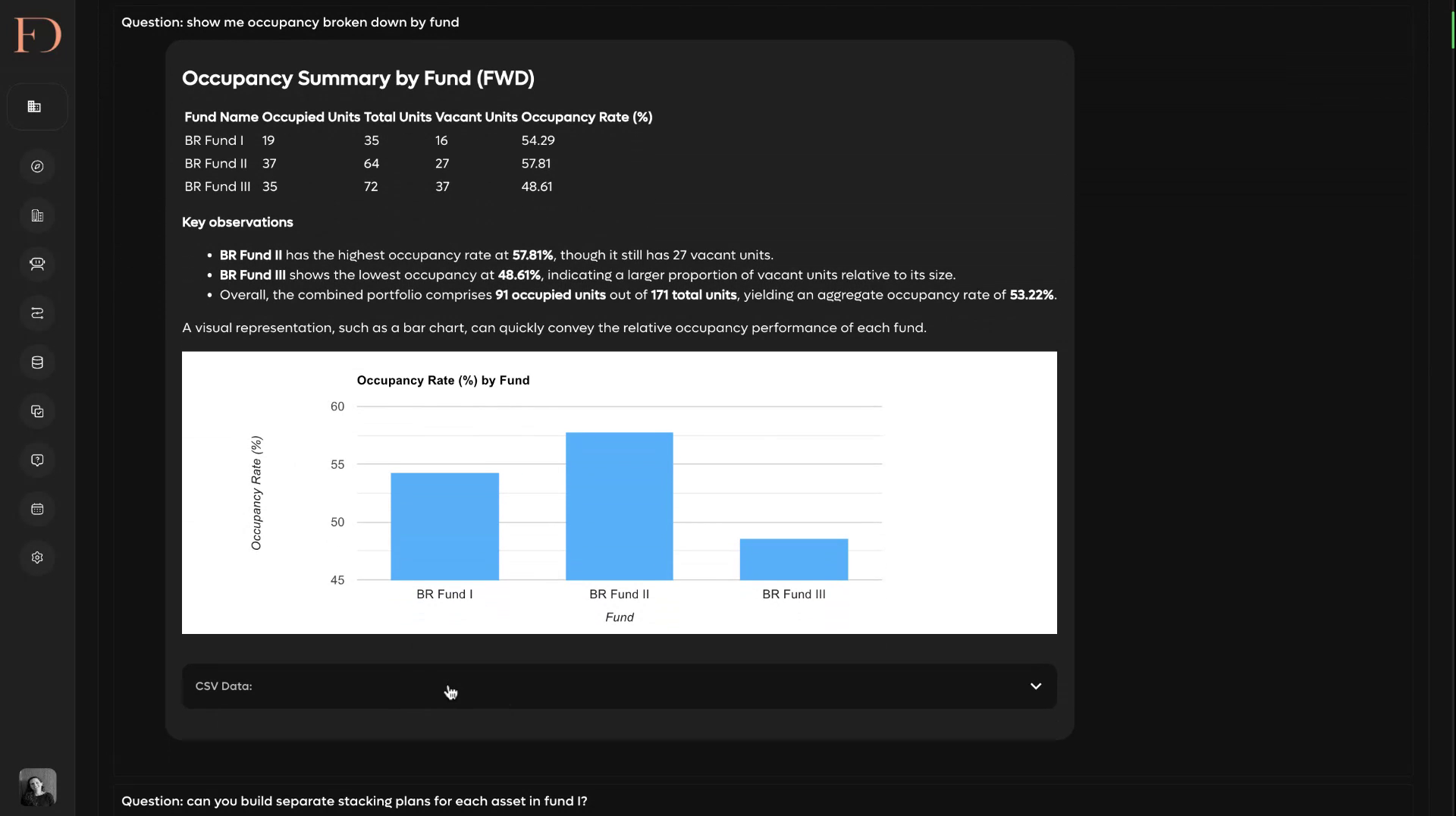
Notice the CSV download at the bottom of every agent response. Your team never loses the raw data behind an answer. One click and the underlying dataset is in Excel.
2. Build Reports With the Visual Report Builder: Then Schedule and Export
For recurring reports (weekly pipeline, Monday rep scorecard, monthly board pack), use the Report Builder. Drag in agent blocks, define your questions, add dynamic variables (topic, date, region), and hit Schedule. The report runs automatically and delivers to email, Slack, or both. Every report is exportable as a formatted PDF with charts and images included.
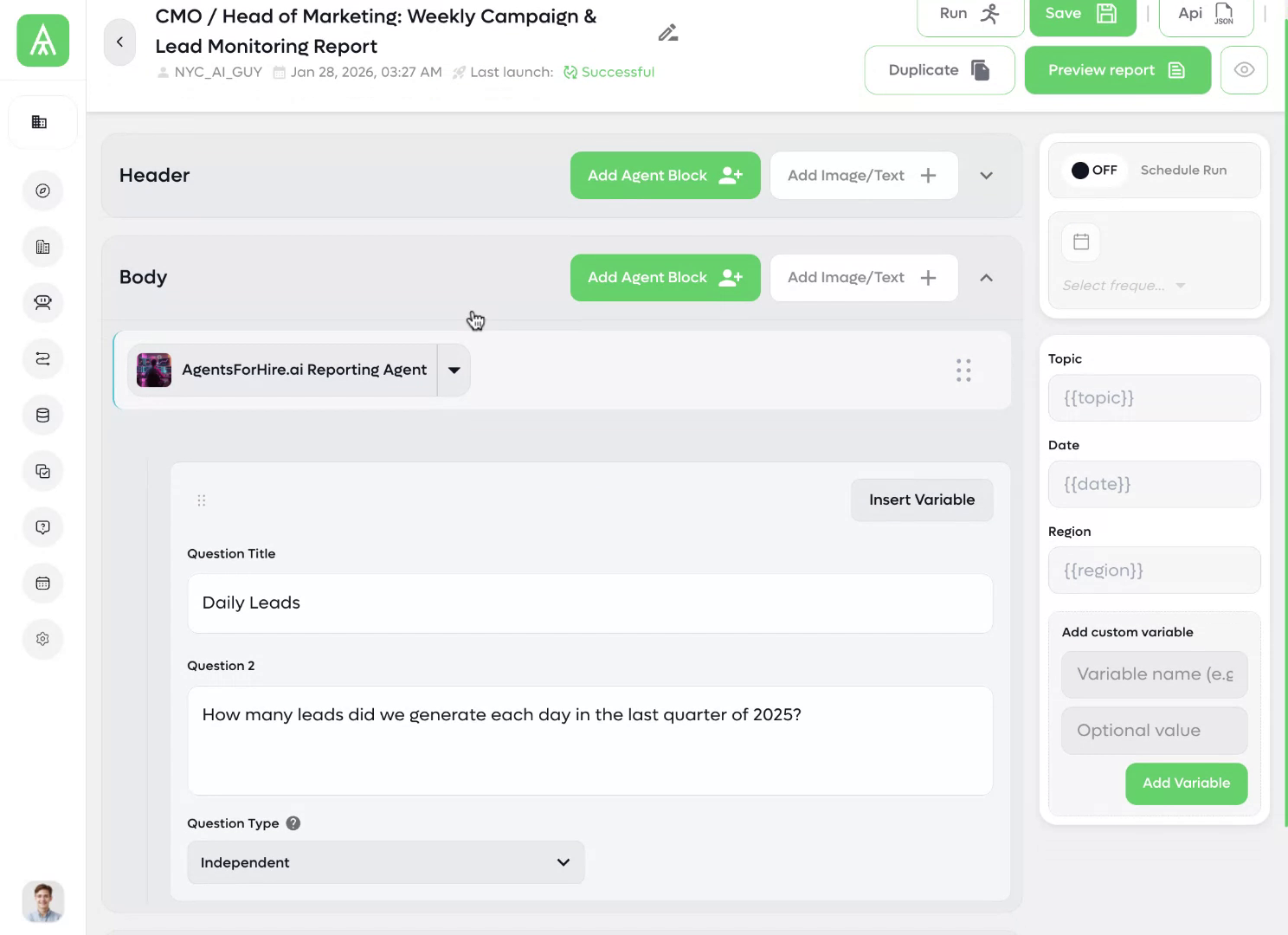
The Report Builder supports multiple agents in a single report. Your CMO report can pull HubSpot lead data, Google Ads campaign performance, and your PostgreSQL conversion data in one document, each answered by the relevant agent, assembled into a single deliverable.
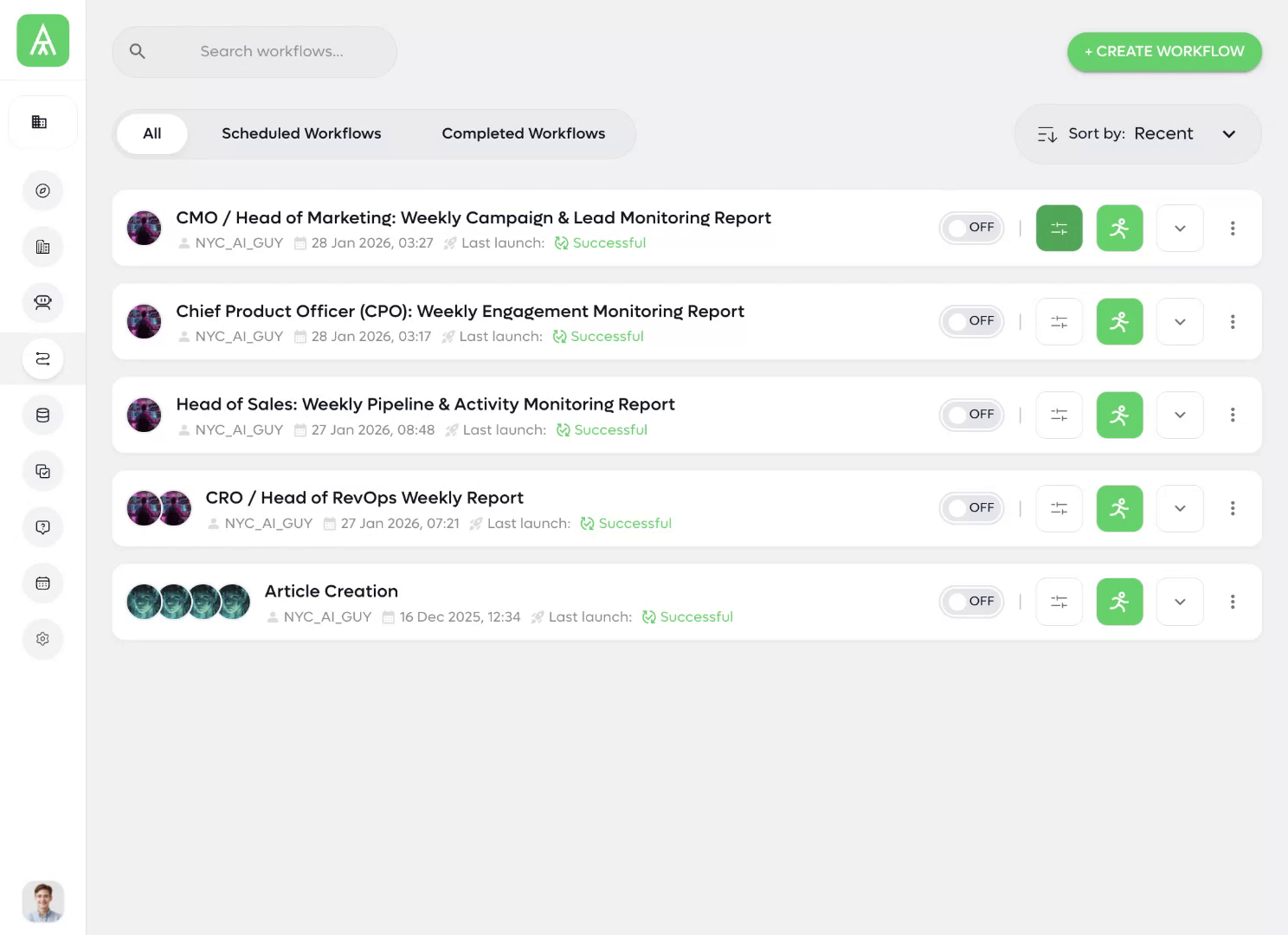
3. Your Full Workflow Library: Scheduled, Tracked, Always Running
Every report you build becomes a workflow. See your full library at a glance: what's scheduled, when it last ran, whether it succeeded. Toggle any report on or off. Run it manually at any time. Duplicate it for a new stakeholder with one click.
See It on Your HubSpot Data
20-minute call. We connect to your HubSpot and answer your actual pipeline questions live. No slides. No scripts. Your data.
Schedule a Call →Calculate My ROIHow the HubSpot RevOps + SalesOps Agent Connects to Your Stack
Setup is three steps. It takes less time than onboarding a new employee.
- Connect HubSpot: Provide your HubSpot API key. The agent indexes your contacts, companies, deals, tickets, and custom objects. Done in under an hour. No developer needed.
- Connect your databases and channels: Add PostgreSQL, SQL, Google Drive, or any API endpoint. Add the Slack integration to your workspace. Configure which channels and team members have access to what data.
- Define your reports and deploy: Tell the agent which reports to run and when to deliver them. Slack alerts, email delivery, or both. Your Monday morning pipeline report is already set up before you leave the onboarding call.
Your Data Stays Yours
AgentsForHire stores zero customer data from your HubSpot connection. Every query runs in real time against your live CRM. Nothing is retained, cached, or used for training. Specific protections:
- No copies of your CRM records on third-party servers
- Role-based access controls: reps see their data, finance sees revenue. No accidental cross-contamination.
- Enterprise-grade encryption in transit and at rest
- SOC2 Type II in progress
- Local model deployment available for strict data residency requirements
Under the Hood: How the Agent Actually Works
The LLM handles language. The Data Node handles data. Your numbers are accurate every time because a real query engine produces them, not a word predictor. This is also why we can guarantee data sovereignty. Your raw data never enters the LLM context window. It never gets sent to OpenAI, Anthropic, or any model provider. It stays in the Data Node, where it belongs.
No data access. No data manipulation. No number crunching.
Every other "AI analytics" tool sends your data into a language model and hopes the math works out. AgentsForHire sends a structured query to a real query engine, gets the exact result, and the LLM only formats the output. Same question, same answer, every time. That's the difference between a word predictor and an analytics platform.
What Teams Get After Deploying the HubSpot RevOps + SalesOps Agent
Industry-Wide Results from HubSpot Automation
The HubSpot RevOps + SalesOps Agent vs. Hiring vs. Building
There are three ways to solve this problem. Here's the honest comparison.
| Approach | Year-1 Cost | Time to First Report | What You Get | What You Don't |
|---|---|---|---|---|
| Hire RevOps / Sales Ops | $100K–$160K/yr salary + 3–6 months to hire (1) | 6–9 months | A person who can build it | Still needs tooling. Attrition risk. One person's bandwidth. |
| Custom BI build (consultant at $25–$250/hr) | $12K–$250K project (6) | 4–12 weeks | Dashboard you specified | Brittle. Breaks when HubSpot changes. No plain-English queries. |
| HubSpot Enterprise + Operations Hub | $54K–$120K/yr (7) | Weeks + mandatory onboarding fees | Better native reporting | Still 5-source cap. Still 3-field chart limit. Still needs someone to run it. |
| AgentsForHire HubSpot RevOps + SalesOps Agent | $18K/yr ($1,500/mo) | 1–3 days | Automated reports, live queries, Slack answers, cross-database analytics, forecasting: running this week | N/A |
The RevOps hire you're considering costs more in the first six months than a full year of AgentsForHire, and won't produce a working report until month three. Most teams don't realize the agent is an option until they're already deep into a hiring process.
Benchmarks Your HubSpot RevOps + SalesOps Agent Tracks by Default
These are the healthy-range benchmarks built into the AgentsForHire reporting guide. The agent monitors all of them continuously and surfaces exceptions automatically. No manual threshold-setting required.
Questions About the HubSpot RevOps + SalesOps Agent
How fast can we actually get this running?+−
Do we need technical resources to deploy or maintain it?+−
Does this replace HubSpot or require us to migrate anything?+−
What HubSpot plan do we need?+−
Is our HubSpot data safe with a third-party agent?+−
Can the agent connect to our database, not just HubSpot?+−
How does Slack integration actually work?+−
Other AI Agents in Your Stack
Each agent connects, deploys in 1–3 days, and runs at $1,500/month. Same platform, different data source.
Deploy Your HubSpot RevOps + SalesOps Agent This Week
You don't need to hire someone to solve this. You need an agent that already knows how.
The AgentsForHire HubSpot RevOps + SalesOps agent connects to your CRM and databases, delivers automated reports on schedule, answers your team's questions in Slack, runs live forecasts on demand, and surfaces deal risks before they become misses. Starting this week, at $1,500/month.
Your next hire should be an SDR, not an analyst.
See the HubSpot Agent Answer Your Questions Live
20-minute call. We connect to your HubSpot and demo the agent on your actual pipeline data. No prep required on your end.
Schedule a Call →Calculate My ROI Firstsales@agentsforhire.ai · 212-203-3012 · Same-day response